Appearance
aix tool
aixTool是一个Java工具包,当中封装了常用的方法和常用的业务通用方法。
快速开始
Maven
<dependency>
    <groupId>com.investoday</groupId>
    <artifactId>aix-tool</artifactId>
    <version>{version}</version>
</dependency>
<dependency>
<groupId>com.investoday</groupId>
<artifactId>aix-tool</artifactId>
<version>{version}</version>
</dependency>环境要求
aixTool是根据JDK1.8版本进行开发的,其他环境暂未测试
版本发布
快速开始
🧐 Request请求类
🧐 redisson缓存工具
Maintain: @huangjx
本工具使用redisson做redis缓存框架,若使用时通过redissonClient进行操作基础类的话,请尽量使用带async的方法发挥其异步性能,并处理好whenComplete((res,exception) -> {})的future
👉 目前工具redis断连补救使用的是原有写的cafiene本地缓存,在原基础添加了批量
1、配置
添加缓存配置yaml文件,放入resources/redisson文件夹内
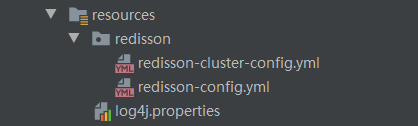
单机redis使用如下配置
yaml#Redisson基础配置 singleServerConfig: address: "redis://127.0.0.1:6379" password: null clientName: null database: 2 #选择使用哪个数据库0~15 idleConnectionTimeout: 10000 pingTimeout: 1000 connectTimeout: 10000 timeout: 3000 retryAttempts: 3 retryInterval: 1500 subscriptionsPerConnection: 5 subscriptionConnectionMinimumIdleSize: 5 subscriptionConnectionPoolSize: 50 connectionMinimumIdleSize: 32 connectionPoolSize: 64 dnsMonitoringInterval: 5000 keepAlive: true pingConnectionInterval: 2 # dnsMonitoring: false threads: 8 nettyThreads: 8 codec: class: "org.redisson.codec.JsonJacksonCodec" transportMode: "NIO"#Redisson基础配置 singleServerConfig: address: "redis://127.0.0.1:6379" password: null clientName: null database: 2 #选择使用哪个数据库0~15 idleConnectionTimeout: 10000 pingTimeout: 1000 connectTimeout: 10000 timeout: 3000 retryAttempts: 3 retryInterval: 1500 subscriptionsPerConnection: 5 subscriptionConnectionMinimumIdleSize: 5 subscriptionConnectionPoolSize: 50 connectionMinimumIdleSize: 32 connectionPoolSize: 64 dnsMonitoringInterval: 5000 keepAlive: true pingConnectionInterval: 2 # dnsMonitoring: false threads: 8 nettyThreads: 8 codec: class: "org.redisson.codec.JsonJacksonCodec" transportMode: "NIO"集群redis使用如下配置
yamlclusterServersConfig: idleConnectionTimeout: 10000 connectTimeout: 10000 timeout: 3000 retryAttempts: 3 retryInterval: 1500 failedSlaveReconnectionInterval: 3000 failedSlaveCheckInterval: 60000 password: null subscriptionsPerConnection: 5 clientName: null loadBalancer: "org.redisson.connection.balancer.RoundRobinLoadBalancer" subscriptionConnectionMinimumIdleSize: 1 subscriptionConnectionPoolSize: 50 slaveConnectionMinimumIdleSize: 24 slaveConnectionPoolSize: 64 masterConnectionMinimumIdleSize: 24 masterConnectionPoolSize: 64 readMode: "SLAVE" subscriptionMode: "SLAVE" nodeAddresses: - "redis://127.0.0.1:7004" - "redis://127.0.0.1:7001" - "redis://127.0.0.1:7000" scanInterval: 1000 pingConnectionInterval: 0 keepAlive: true tcpNoDelay: false threads: 16 nettyThreads: 32 codec: "org.redisson.codec.JsonJacksonCodec" transportMode: "NIO"clusterServersConfig: idleConnectionTimeout: 10000 connectTimeout: 10000 timeout: 3000 retryAttempts: 3 retryInterval: 1500 failedSlaveReconnectionInterval: 3000 failedSlaveCheckInterval: 60000 password: null subscriptionsPerConnection: 5 clientName: null loadBalancer: "org.redisson.connection.balancer.RoundRobinLoadBalancer" subscriptionConnectionMinimumIdleSize: 1 subscriptionConnectionPoolSize: 50 slaveConnectionMinimumIdleSize: 24 slaveConnectionPoolSize: 64 masterConnectionMinimumIdleSize: 24 masterConnectionPoolSize: 64 readMode: "SLAVE" subscriptionMode: "SLAVE" nodeAddresses: - "redis://127.0.0.1:7004" - "redis://127.0.0.1:7001" - "redis://127.0.0.1:7000" scanInterval: 1000 pingConnectionInterval: 0 keepAlive: true tcpNoDelay: false threads: 16 nettyThreads: 32 codec: "org.redisson.codec.JsonJacksonCodec" transportMode: "NIO"👉 Tips: 当两配置同时存在时默认使用单机配置
2、使用
=> 单个key-value缓存形式(此方式包含redis中断后的补救)
1)、存入 & 取出
java@Test public void testRedissonGetValue() { Person p = new Person("xxxxx", 10); CacheUtil.saveObjByKeyValue("keyxxx", p); String resultStr = CacheUtil.getKVCacheToString("keyxxx"); System.out.println(resultStr); Person resultClass = CacheUtil.getKVCacheToClass("keyxxx", Person.class); System.out.println(resultClass); } //result {"name":"xxxxx","age":10} Person(name=xxxxx, age=10)@Test public void testRedissonGetValue() { Person p = new Person("xxxxx", 10); CacheUtil.saveObjByKeyValue("keyxxx", p); String resultStr = CacheUtil.getKVCacheToString("keyxxx"); System.out.println(resultStr); Person resultClass = CacheUtil.getKVCacheToClass("keyxxx", Person.class); System.out.println(resultClass); } //result {"name":"xxxxx","age":10} Person(name=xxxxx, age=10)=> 批量key-value缓存形式(此方式包含redis中断后的补救)
1)、存入
java@Test public void testRedissonSetBatchValue2() { Person p = new Person("xxxxx", 10); Map<String, Object> inputMap = Maps.newHashMap(); for (int i = 0; i <= 10000; i++) { String key = "test:keyPerson" + i; inputMap.put(key, p); } CacheUtil.saveBatchObject(inputMap);//以map<String, Object>形式存入 }@Test public void testRedissonSetBatchValue2() { Person p = new Person("xxxxx", 10); Map<String, Object> inputMap = Maps.newHashMap(); for (int i = 0; i <= 10000; i++) { String key = "test:keyPerson" + i; inputMap.put(key, p); } CacheUtil.saveBatchObject(inputMap);//以map<String, Object>形式存入 }2)、取出
java@Test public void testGetBatch() { List<String> keyVals = Lists.newArrayList(); for (int i = 0; i <= 10000; i++) { String key = "test:keyPerson" + i; keyVals.add(key); } List<Person> batchKVCachesToClass = CacheUtil.getBatchKVCachesToClass(keyVals, Person.class);//成类 System.out.println(batchKVCachesToClass); String batchKVCachesToString = CacheUtil.getBatchKVCachesToString(keyVals);//成字符串 System.out.println(batchKVCachesToString); } //result [Person(name=xxxxx, age=10), Person(name=xxxxx, age=10), Person...] [{"name":"xxxxx","age":10},{"name":"xxxxx","age":10},{"name":"xxxxx","age":10},...]@Test public void testGetBatch() { List<String> keyVals = Lists.newArrayList(); for (int i = 0; i <= 10000; i++) { String key = "test:keyPerson" + i; keyVals.add(key); } List<Person> batchKVCachesToClass = CacheUtil.getBatchKVCachesToClass(keyVals, Person.class);//成类 System.out.println(batchKVCachesToClass); String batchKVCachesToString = CacheUtil.getBatchKVCachesToString(keyVals);//成字符串 System.out.println(batchKVCachesToString); } //result [Person(name=xxxxx, age=10), Person(name=xxxxx, age=10), Person...] [{"name":"xxxxx","age":10},{"name":"xxxxx","age":10},{"name":"xxxxx","age":10},...]=> 使用分布式锁
java@Test public void testRedissonLock() { RLock lock = CacheUtil.getNormalLock("lock1"); System.out.println(lock.isLocked()); lock.lock(10, TimeUnit.SECONDS); System.out.println(lock.isLocked()); RLock lock1 = CacheUtil.getNormalLock("lock1"); System.out.println(lock1.isLocked()); //直接使用 CacheUtil.lockCurrent("lock2"); CacheUtil.lockCurrent("lock3", 10, TimeUnit.SECONDS); CacheUtil.unLockCurrent("lock2");//解锁 }@Test public void testRedissonLock() { RLock lock = CacheUtil.getNormalLock("lock1"); System.out.println(lock.isLocked()); lock.lock(10, TimeUnit.SECONDS); System.out.println(lock.isLocked()); RLock lock1 = CacheUtil.getNormalLock("lock1"); System.out.println(lock1.isLocked()); //直接使用 CacheUtil.lockCurrent("lock2"); CacheUtil.lockCurrent("lock3", 10, TimeUnit.SECONDS); CacheUtil.unLockCurrent("lock2");//解锁 }👉 Tips: 使用锁的时候最好使用try->catch->finnal{lock.unlock()} 或者 lock(key, time, timeUnit) 的方法以防死锁
=> 使用带本地缓存的map类缓存
此方法除了会使用redis存储外,还会在本地进行缓存,使读取速度提升45倍,但无redis的情况下无法使用 ** 特别要注意的是,此方式存储的是一个map,并不是常用的只有一层的key-value形式
java@Test public void testRedissonSetBatchValue1() { List<String> val = Lists.newArrayList("1", "2", "3"); RLocalCachedMap map = CacheUtil.getLocalCacheRMap("map1"); for (int i = 0; i <= 100000; i++) { String key = "key" + i; map.putAsync(key, val); } RLocalCachedMap checkMap = CacheUtil.getLocalCacheRMap("map1"); Object key2431 = checkMap.get("key2431"); System.out.println(key2431); //结论-->使用putAllAsync是最快的方法 }@Test public void testRedissonSetBatchValue1() { List<String> val = Lists.newArrayList("1", "2", "3"); RLocalCachedMap map = CacheUtil.getLocalCacheRMap("map1"); for (int i = 0; i <= 100000; i++) { String key = "key" + i; map.putAsync(key, val); } RLocalCachedMap checkMap = CacheUtil.getLocalCacheRMap("map1"); Object key2431 = checkMap.get("key2431"); System.out.println(key2431); //结论-->使用putAllAsync是最快的方法 }
3、获取基础类的方法
如果想直接使用redisson类来调用其方法可以直接获取基础类
- 1.redissonClient
- 使用此类可以使用到未封装的一些数据类型(BitSet, Set, Multimap, SortedSet, Map, List, Queue, BlockingQueue, Deque, BlockingDeque, Semaphore, Lock, AtomicLong, CountDownLatch, Publish / Subscribe, Bloom filter, Remote service, Spring cache, Executor service, Live Object service, Scheduler service)
- 之后若需要则继续封装
java
RedissonClient redissonClient = RedissonManager.getRedissonClient();RedissonClient redissonClient = RedissonManager.getRedissonClient();- 2.transaction
java
RTransaction transaction = CacheUtil.getTransaction();RTransaction transaction = CacheUtil.getTransaction();- 3.各类option的config,可以获取后自己设置
java
//批处理设置
BatchOptions defaultBatchOptions = CacheMethodOptions.getDefaultBatchOptions();
//本地缓存map设置
LocalCachedMapOptions defaultLocalCachedMapOptions = CacheMethodOptions.getDefaultLocalCachedMapOptions();
//事务设置
TransactionOptions defaultTransactionOptions = CacheMethodOptions.getDefaultTransactionOptions();
//批处理设置
BatchOptions defaultBatchOptions = CacheMethodOptions.getDefaultBatchOptions();
//本地缓存map设置
LocalCachedMapOptions defaultLocalCachedMapOptions = CacheMethodOptions.getDefaultLocalCachedMapOptions();
//事务设置
TransactionOptions defaultTransactionOptions = CacheMethodOptions.getDefaultTransactionOptions();🧐 PageHelper 全量数据分页辅助
java
List<String> userAccountIds = userMapper.listUserAccountIds();
//数据按100页长进行分页
PageHelper<String> pageUserAccount = new PageHelper(userAccountIds, 100);
for(int i=1 ; i <= pageUserAccount.getPages(); i++){
		List<String> subAccountIds = pageUserAccount.getSubDataByPage(i);
}List<String> userAccountIds = userMapper.listUserAccountIds();
//数据按100页长进行分页
PageHelper<String> pageUserAccount = new PageHelper(userAccountIds, 100);
for(int i=1 ; i <= pageUserAccount.getPages(); i++){
List<String> subAccountIds = pageUserAccount.getSubDataByPage(i);
}SecurityUtil 加密工具类
- 1.RSA加解密(公钥加密,私钥解密)
java
// 原始数据
String data = "测试001";
Map<String, String> rsaKeysMap = SecurityUtil.createRSAKeys();
String publicKey = rsaKeysMap.get("RSAPublicKey");
String privateKey = rsaKeysMap.get("RSAPrivateKey");

// 加密数据
String encodeData = SecurityUtil.encodeData(data, publicKey);
// 解密数据
String decodeData = SecurityUtil.decodeData(encodeData, privateKey);
// 原始数据
String data = "测试001";
Map<String, String> rsaKeysMap = SecurityUtil.createRSAKeys();
String publicKey = rsaKeysMap.get("RSAPublicKey");
String privateKey = rsaKeysMap.get("RSAPrivateKey");
// 加密数据
String encodeData = SecurityUtil.encodeData(data, publicKey);
// 解密数据
String decodeData = SecurityUtil.decodeData(encodeData, privateKey);